Photo Tools : Image Editor App icon

Photo Tools : Image Editor App

DIGIT GROVE
★ 4.1 (944 ratings)
⬇ 100,000+ downloads
Est. actual: 133,542
Free
Released: Mar 17, 2016
No in-app purchases
Contains ads
Rated: Everyone

Signals

4 this week · 1 positive · 2 warnings All of this week's signals →
  • 📈Last 7 days +6 installs — 57% slower than the week before (+14) · 1/day since Sep 29
  • 🏆Among Tools apps top 48% by installs gained this week (1273 peers growing)
  • ⭐Rating steady at ★ 4.11 since Sep 29
  • 🛠Updates dormant · updated 1615 days ago
Installs since launch
0 67K 134K 134K Mar 17, 2016 today
+44 installs · 0 ratings since Sep 29
Update history
1.2.05 Jun 11, 2022 · seen Sep 29, 2026
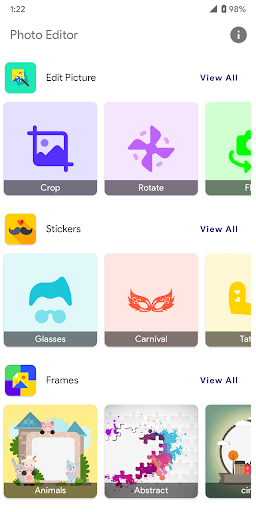
<br>Version 1.2.05<br>✓ Photo Editing - Rotate, Flip, Brightness, Contrast, Exposure and more<br>✓ Photo Tools - Image Converter, Magnifier and Compress Photos<br>✓ Photo Filters - Variety of stunning Photo beautification color controls<br>✓ Photo Frames - lots of elegant frames for your favourite pictures<br>✓ Photo Stickers, Photo Drawing, Photo Text and photo cutting
Only the current version so far — new entries appear as the app ships updates.
Photo Tools : Image Editor App screenshotPhoto Tools : Image Editor App screenshotPhoto Tools : Image Editor App screenshotPhoto Tools : Image Editor App screenshotPhoto Tools : Image Editor App screenshotPhoto Tools : Image Editor App screenshotPhoto Tools : Image Editor App screenshotPhoto Tools : Image Editor App screenshot

Photo Tools : Image Editor App is a tools app by DIGIT GROVE with 100,000+ downloads (about 134K estimated). +6 installs in the last 7 days. Rated 4.1 from 944 ratings. Released Mar 17, 2016. Install growth, rank history, SDKs and ad networks.

From the store listing: “Photo Tools has a huge collection of features such as Photo editing, Photo Frames, Stickers, Drawing, Text, Image Conversion, Compression, Magnifier and lot more attractive features to apply on your Selfies, Camera Photos and device Pictures. ★★ Features of Photo Tools App ★★ Photo Editing • Photo Cropping : Cut…”