ReleasedNov 6, 2026
Last updateNov 27, 2026
Version1.3.1
Ratings0
Ratings, 7 dayscollecting
Size40 MB
Languages1
Ratings over time
Tracking started recently; the line appears after a few days of data.
Versions
1.3.1 Nov 27, 2026• Text: Add > Text opens a full-screen text editor. Pick one of 10 looks (Neon glows), a color or your own, the alignment, and a solid or soft background behind each line or across the full width. Animate it with Fade, Slide, Pop or Typewriter. Drag a text to move it, pinch to resize it and turn it with two fingers; it snaps to the center, and the trash deletes it. Tap a text on the video to selec
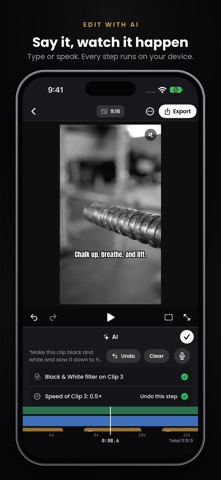
1.3 Nov 17, 2026• Edit with AI: tap the Edit with AI pill on the video, then type what you want or tap the microphone and say it. The steps are listed, then done one by one where you can see them. Touch anything to take over, and one Undo takes back the whole edit. It needs Apple Intelligence, understands English, and runs on your device.
• More than 900 templates in two sections, Templates and Islamic, with sear
Description
Zywa Studio is a video editor that does all of its work on your iPhone or iPad. On iPhone it is Basic, a simple editor in portrait. On iPad, choose Basic or Advanced, a full studio with a magnetic timeline. No account, no upload, no server: your media and projects stay on your device.
NEW: CAMERA CONTROLS AND VIEWER
• Connect a Sony camera by cable or Wi-Fi (tested with the ZV-E1): see its picture live, record, and change its settings.
• On iPhone, turn it sideways and the picture fills the scr